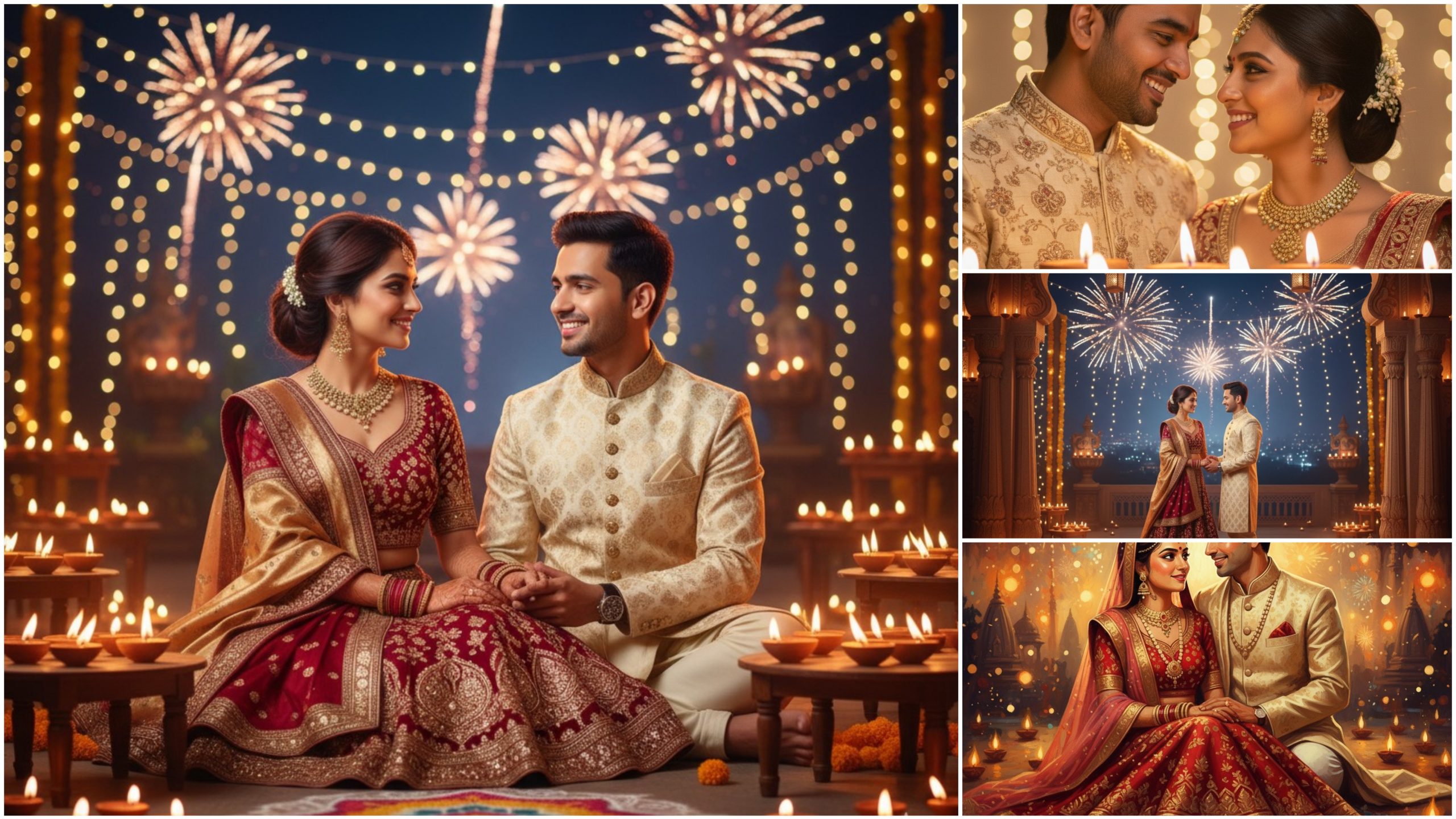
This Diwali Couple Prompt Pack is specially designed for AI photo editors and creators who want to turn ordinary couple photos into magical, festive portraits.
These prompts help you generate or edit stunning couple images featuring traditional outfits, glowing diyas, warm lighting, and romantic festive vibes — perfect for Diwali posters, social media edits, or creative AI projects.
Each prompt is carefully crafted to give your photos that perfect mix of romance, tradition, and celebration. Whether you’re using Gemini, Midjourney, Leonardo AI, or any other AI editor, these prompts work beautifully to bring your Diwali story to life.
How to use a Diwali Couple Gemini prompt — Step-by-step
Want to turn a couple photo into a warm, festive Diwali portrait using Gemini? Follow these clear steps — plus ready-to-paste prompts and quick tweak tips.
1) Open Gemini
Open the Gemini app or the Gemini image interface in your browser.
2) Choose mode
Select “Edit image” (if you have a photo) or “Generate image” (if you want a new image from scratch).
3) Upload the couple photo (for editing)
Upload a high-resolution image for best results. If it’s a generate task, skip this step.
4) Set basic options
If Gemini shows options, choose or note:
Aspect ratio (e.g., 3:4 for portraits, 16:9 for wider scene)
Output resolution or quality (choose high if available)
Style presets (if any: “realistic”, “cinematic”, “illustration”)
5) Build your prompt (use the structure below)
Compose the prompt in this order for clarity:
1. Main directive — what to do to the image.
2. Scene & mood — Diwali, romantic, festive, warm.
3. Key elements — diyas, rangoli, fireworks, bokeh, traditional clothes.
4. Style & lighting — cinematic lighting, soft golden rim light, warm color grade.
5. Camera & composition — close-up, 35mm portrait look, shallow depth of field.
6. Finish & technical — realistic, high resolution, subtle skin retouch.
7. Optional negatives — what to avoid (e.g., no logos, no heavy filters).
6) Copy-paste ready prompts (use directly in Gemini)
A) Realistic romantic Diwali edit (portrait)
Edit uploaded image: Diwali couple portrait — warm, romantic festival mood with glowing diyas and soft golden bokeh. Subject in traditional Indian attire, subtle rangoli at feet, gentle fireworks blur in background. Cinematic soft rim light, warm orange-gold color grading, shallow depth of field (35mm portrait feel), realistic skin retouch, high resolution. No logos or text.

B) Cinematic wide scene (couple + environment)
Edit uploaded image: cinematic Diwali scene of couple standing on a decorated balcony, warm lamplight, hanging lanterns and fireworks in distance, rich maroon and gold tones, dramatic soft shadows, wide-angle composition, photorealistic, high detail, 16:9 aspect.

C) Close-up romantic moment (intimate)
Edit uploaded image: close-up of couple sharing a smile, warm candlelight glow on faces, golden rim light, soft bokeh diyas in foreground, gentle film grain, pastel warm color palette, 3:4 aspect, realistic finish.

D) Stylized illustrative variant
Generate an illustrated Diwali couple portrait in oil-painting style: glowing diyas, decorative rangoli, rich textures, warm color palette, soft glowing particles, romantic composition, painterly brush strokes, high detail.

(Use any one prompt and tweak phrases as needed.)
7) Paste prompt and choose strength/variations
Paste the prompt into Gemini.
If Gemini offers strength (how strongly to apply edit), start medium (50–70%).
Generate 2–4 variations to pick the best result.
8) Review result
Look for:
Lighting & color accuracy (warm golds?)
Faces: natural skin tones and expressions
Props: diyas, rangoli correctly placed
Composition & crop
9) Tweak & iterate
If not perfect, change small parts of prompt:
“Increase bokeh intensity”
“Reduce fireworks brightness”
“Make skin tone slightly warmer”
Re-run until satisfied.
10) Export & final touchups
Download
the high-res image. Optionally finish in an editor (Photoshop / mobile app) for minor retouches or watermarking.